Classes & Access Modifiers
Topic 1: Classes & Access Modifiers (public, private, protected, inheritance, abstract classes)
1. Problem Statement
Problem Statement: EduFlow’s Content Control Crisis
EduFlow Academy is a rapidly growing EdTech Startup.
But chaos is brewing:
-
Learners are somehow changing quiz questions after starting a quiz.
-
Instructors sometimes accidentally publish unfinished lessons.
-
Admins want to review everything, but sometimes they accidentally change published or sensitive content.
-
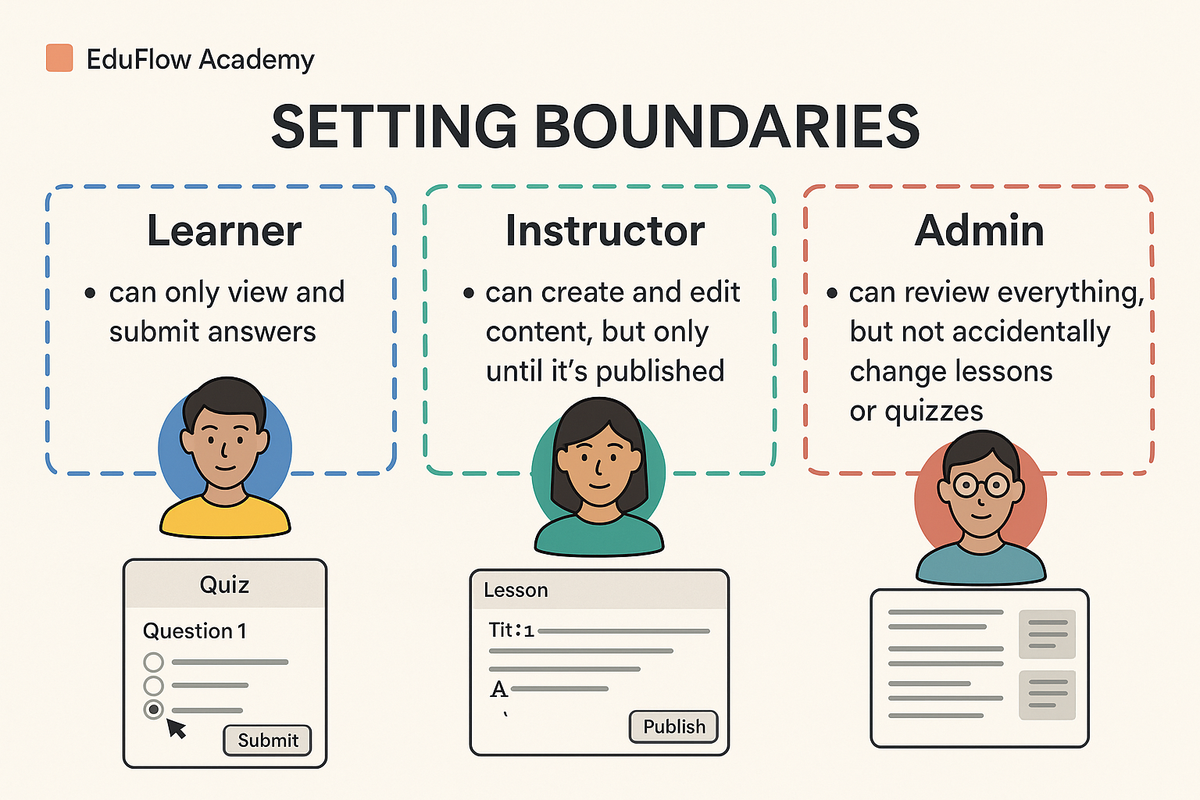
Your mission:
Design a system so that:
-
Learners can only view and submit answers.
-
Instructors can create and edit content, but only before it’s published.
-
Admins can review all content, but not accidentally change published materials.
Expected outcome:
A secure, organized platform where each role has just the right level of access, and shared features are coded only once.
2. Learning Objectives
By the end of this lesson, you’ll be able to:
-
Use
public,private, andprotectedto control access to data and actions. -
Apply inheritance to share common features between content types.
-
Create abstract classes as blueprints for specialized content.
-
Build a secure, organized content management system for EduFlow Academy.
3. Concept Introduction with Office Building Analogy
Think of your code as an office building:
| Area/Room | Access Modifier | Who Can Enter? | What Happens Here? |
|---|---|---|---|
| Lobby & Hallways | public | Everyone (employees, managers, directors) | Viewing shared info, casual meetings |
| Manager’s Office | private | Only the manager (the class itself) | Working on sensitive projects |
| Shared Meeting Room | protected | Managers and directors (class & subclasses) | Team planning, confidential reviews |
| Building Blueprint | Abstract Class | Blueprint for all rooms | Sets required features for all rooms |
Sets required features for all rooms
-
public: Open to all, like the lobby.
-
private: Only for the room owner, like a locked office.
-
protected: For managers and directors, like a meeting room with restricted access.
-
abstract class: The blueprint for all rooms; you can’t walk into a blueprint, but every room follows its design.
What Are Classes in TypeScript?
A class in TypeScript is a blueprint for creating objects with specific properties (fields) and methods (functions).
Classes support object-oriented programming concepts like encapsulation, inheritance, and abstraction
Access Modifiers: Controlling Visibility
Access modifiers determine where class members (properties and methods) can be accessed.
Public
-
Default modifier.
-
Members are accessible from anywhere (inside/outside the class)
class Person {
public name: string;
constructor(name: string) {
  this.name = name;
}
}
const p = new Person("Alice");
console.log(p.name); // OK
Private
-
Accessible only within the class where declared.
-
Not accessible in subclasses or from outside.
class Secret {
 private code: string;
 constructor(code: string) {
   this.code = code;
 }
 reveal() {
   return this.code;
 }
}
const s = new Secret("1234");
// console.log(s.code); // Error: Property 'code' is private
console.log(s.reveal()); // OK
Protected
- Accessible within the class and its subclasses (not outside)
class Animal {
protected species: string;
constructor(species: string) {
  this.species = species;
}
}
class Dog extends Animal {
bark() {
  return `Woof! I am a ${this.species}`;
}
}
const d = new Dog("canine");
console.log(d.bark()); // OK
// console.log(d.species); // Error: Property 'species' is protected
Read-Only
- Not an access modifier, but ensures the value can’t be changed after initialization.
class Book {
readonly isbn: string;
constructor(isbn: string) {
  this.isbn = isbn;
}
}
const b = new Book("123-456");
// b.isbn = "789-101"; // Error: Cannot assign to 'isbn' because it is a read-only property
Inheritance: Extending Classes
Inheritance lets you create a new class (child/subclass) that inherits properties and methods from another class (parent/superclass)
class Vehicle {
public brand: string;
constructor(brand: string) {
  this.brand = brand;
}
drive() {
  console.log(`${this.brand} is moving`);
}
}
class Car extends Vehicle {
public model: string;
constructor(brand: string, model: string) {
  super(brand); // calls Vehicle's constructor
  this.model = model;
}
drive() {
  super.drive(); // call parent method
  console.log(`Model: ${this.model}`);
}
}
const myCar = new Car("Toyota", "Corolla");
myCar.drive();
// Output: Toyota is moving
//         Model: Corolla
The super keyword calls the parent class’s constructor or methods.
Abstract Classes: Defining Contracts
An abstract class is a class that cannot be incorporated directly. It’s used as a base for other classes and can include:
-
Abstract methods: Declared without implementation-must be implemented by subclasses.
-
Concrete methods: Fully implemented in the abstract class.
Combining Access Modifiers with Constructors
class Person {
 constructor(public name: string, private age: number) {}
 public getAge(): number {
   return this.age;
 }
}
const john = new Person('John', 30);
console.log(john.name); // OK
console.log(john.getAge()); // OK
// console.log(john.age); // Error: 'age' is private
TypeScript allows you to declare and initialize properties directly in the constructor using access modifiers
4. Step-by-Step Data Modeling
Let’s start by designing the Content blueprint that every content type must follow.
// Abstract class: the blueprint for all content
abstract class Content {
public readonly title: string;
public readonly author: string;
private published: boolean = false;

constructor(title: string, author: string) {
  this.title = title;
  this.author = author;
}

public publish() {
  this.published = true;
}

protected isPublished(): boolean {
  return this.published;
}

// Every content type must say what type it is
abstract getType(): string;
}
-
Contentis the abstract class (blueprint). -
Every content has a title, an author, and can be published (locked for editing).
-
Only subclasses must implement
getType().
5. Live Code Walkthrough
Quiz: Controlled Question Editing
class Quiz extends Content {
private questions: string[] = [];

constructor(title: string, author: string, questions: string[] = []) {
  super(title, author);
  this.questions = questions;
}

public addQuestion(question: string, isInstructor: boolean) {
  if (!this.isPublished() && isInstructor) {
    this.questions.push(question);
  } else {
    throw new Error("Cannot add questions after publishing or if not an instructor.");
  }
}

public getQuestions(): string[] {
  return [...this.questions];
}

getType(): string {
  return "Quiz";
}
}
- Only instructors can add questions, and only before publishing.
Lesson: Safe Content Editing
class Lesson extends Content {
private content: string;

constructor(title: string, author: string, content: string) {
  super(title, author);
  this.content = content;
}

public editContent(newContent: string, isInstructor: boolean) {
  if (!this.isPublished() && isInstructor) {
    this.content = newContent;
  } else {
    throw new Error("Cannot edit content after publishing or if not an instructor.");
  }
}

public getContent(): string {
  return this.content;
}

getType(): string {
  return "Lesson";
}
}
- Only instructors can edit content, and only before publishing.
6. Challenge
Your Turn!
-
Create an
Assignmentclass extendingContent. -
Add a
dueDateproperty (private). -
Allow only instructors to set or update the due date before publishing.
-
Implement
getType()returning"Assignment".
Try it yourself before checking the solution!
7. Quick Recap & Key Takeaways
-
public: Anyone can use these features. -
private: Only the class itself can access. -
protected: Shared with subclasses. -
Inheritance: Share common features across different content types.
-
Abstract classes: Set blueprints for all content, requiring certain features.
8. (Optional) Programmer’s Workflow Checklist
-
Identify shared features for all content → put in abstract class.
-
Use
privatefor sensitive info (questions, content, due dates). -
Use
protectedfor features shared with subclasses. -
Expose safe actions with
publicmethods. -
Test access by role (learner, instructor, admin).
9. Coming up next
Unlock the power of Generics!
Imagine designing tools (like boxes or folders) that magically adapt to hold any kind of content-quiz, lesson, or assignment. You’ll learn how to build these flexible, reusable tools in TypeScript!